In this guide
These controls do different jobs
AC/DC capability, AC balance and pulse are separate features. A machine with DC pulse is not thereby an AC TIG machine. Read the supported outputs and controls carefully, especially if aluminium is on your job list.
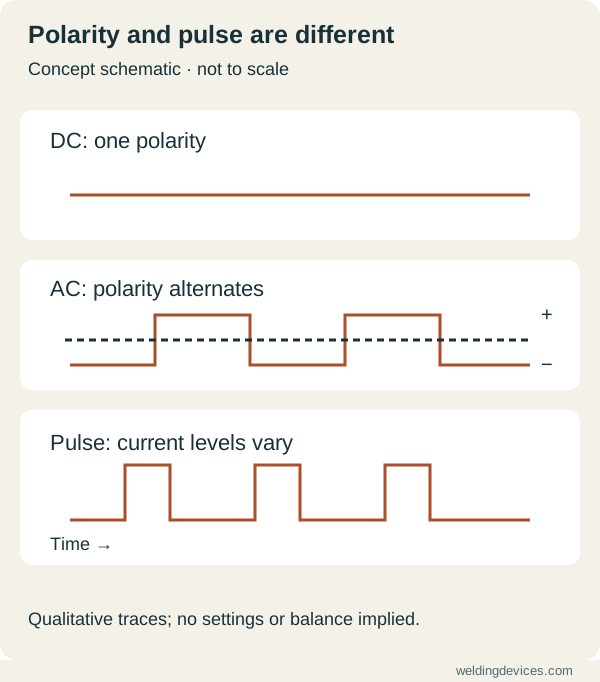
Schematic; source.
What AC balance changes
In common AC TIG aluminium work, the electrode-positive part of the cycle contributes oxide cleaning, while the electrode-negative part contributes heating of the workpiece. Balance changes the proportion. Different manufacturers may label the control differently, so confirm whether the display refers to cleaning or electrode-negative time.
What pulsing changes
Pulse varies current between levels over time. Frequency, peak duration and background current interact. Adjusting one number without knowing what it represents can make comparisons confusing. Begin with the manufacturer’s guidance for the application.
Workshop example
At a machine demonstration, ask the supplier to name each control and explain its effect on a representative coupon. Photograph the settings and label them in your notes. Compare like functions rather than assuming that identical screen percentages mean identical behaviour.
Before choosing a machine
- Confirm AC output if the intended TIG work requires it.
- Check the manual’s balance convention.
- Confirm the current range and remote-control compatibility.
- Identify which pulse functions operate in AC and DC modes.
The best setting depends on the joint, alloy, electrode and equipment. A general explanation of the control is not a validated welding procedure.
Make a control map before the first trial
Open the exact machine manual and identify which controls are available in your selected mode. Write each name beside its documented purpose. A control hidden in an advanced menu may behave differently from a similar label on another machine. Record whether a value is a time, current, percentage or frequency, and keep the manufacturer's explanation of the scale.
This simple map is useful when watching demonstrations. You can distinguish a change to output mode from a change to pulse timing or the start sequence. Avoid copying a photograph of someone's settings without the machine, material and procedure context. The official manuals library helps locate the documentation that makes the display meaningful.
Learn DC operation on a suitable exercise
For a supervised introductory exercise, ask the instructor to select compatible identified material and a documented setup. Begin with the fundamental movement: a stable torch position, a visible weld pool and controlled filler feeding where the exercise uses filler. Keep advanced options at the chosen baseline so that you can see which problem belongs to coordination and which belongs to setup.
Record the coupon and configuration before adjusting a control. If your tungsten touches the pool or filler, stop and follow the correct preparation method rather than trying to compensate with an unrelated setting. The TIG basics lesson separates hand practice from the later exploration of machine features. A more complicated display does not remove the need for those basic skills.
Read AC balance in the manufacturer's terms
Before changing balance, establish what the displayed percentage represents. Manufacturers can label their interfaces differently. A numerical value without that definition is an incomplete instruction. Check the permitted adjustment range, electrode recommendations and material-specific guidance in the documentation. Use the instructor's or applicable procedure's baseline for your trial.
On a labelled coupon, note the starting value and the observation you are investigating. Keep other variables steady where practical. Ask your instructor to interpret the result and decide whether another change is justified. This gives a clear lesson about the control. Randomly moving balance, current and torch position together may produce a different bead while leaving you no better informed about why.
Use pulse as a deliberate exercise
Separate the pulse controls into their documented elements. Identify which value describes peak current, background current, repetition and relative time where those adjustments are offered. Ask the instructor to choose a compatible practice setup. Record both the baseline and any change, keeping the coupon and hand movement as consistent as the exercise allows.
A trial can ask a narrow question, such as whether a particular setup makes a repeated movement easier to control. Record observations without claiming an improvement in strength or heat input that you did not measure. Compare finishing, dimensions and inspection where relevant. Pulse is most useful to learn when you have a specific question, rather than a belief that more pulses must always be better.
Include the beginning and end
Start methods, slope controls, remote current control and post-flow can matter alongside the main welding settings. Learn their names and limitations from the manual. Practise a short start-and-stop exercise with supervision and inspect the full result. Do not judge the configuration only from the central section of a long bead.
Keep a small notebook of supported setups with the model, material, consumable, configuration and purpose. Include unresolved questions for the next lesson. That notebook should help you repeat supervised practice, rather than act as a universal recipe book. When the material, joint or service requirement changes, return to the relevant procedure and qualified guidance before carrying over the settings.
Put the choice in context.
Try the welding process finder to narrow your equipment research, or compare a complete setup in the ownership cost calculator.
References
Open the publisher’s page. If a new tab fails, use “Open directly” or copy the address into your browser.
- Miller — TIG waveforms and controls · sourceOpens the source in a new tabmillerwelds.comLink checked · 31 Oct
- Miller — AC balance for aluminium TIGOpens the source in a new tabmillerwelds.comLink checked · 31 Oct
- Miller — Understanding TIG pulse settingsOpens the source in a new tabmillerwelds.comLink checked · 31 Oct
